


Design Home - AI Home Makeover
0.00.00 Reviews
App Specs
- Version
- 1.0.1
- Updated On
- License
- Free
- Downloads
- 10,000+
- Developer
- INFINITE HILLS PRODUCTIONS INC
- Categories
- Art & Design
- Platform
- Android
Screenshots
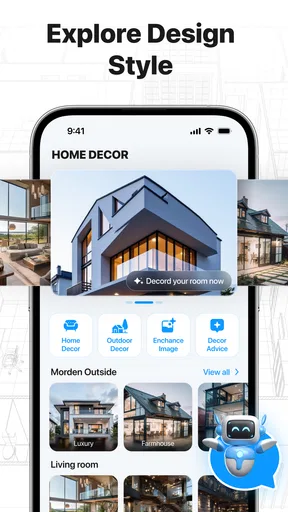

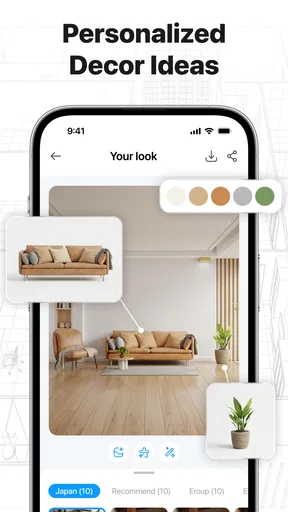
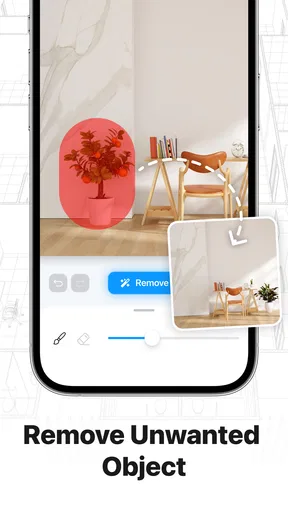
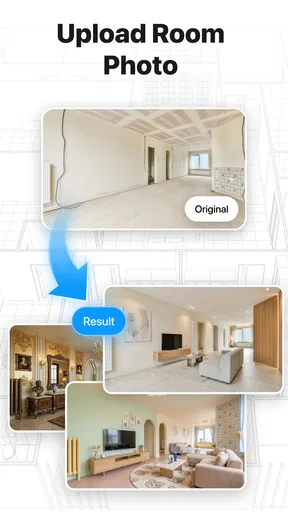

 Analysis by AppCompare
When I look at an AI home-design app, I care about more than whether it can produce an attractive room concept. I also want to know what choices I’m making when I use it, especially if I’m working with photos of my own home. Design Home is an art-and-design app from INFINITE HILLS PRODUCTIONS INC, aimed at people exploring makeover ideas. Its promise is appealing, but I’d approach it as a source of visual inspiration rather than a complete renovation planner.
Trust starts with what the app actually shows
With a creative app, I don’t expect every design choice to carry a privacy concern, but room photos can be personal in ways that are easy to overlook. I’d judge trust through the permissions, account options, and explanations that appear in the app itself. A polished design result is not, by itself, evidence about how an image is handled, so I wouldn’t fill in those blanks with assumptions.
That approach also helps answer a practical question: can I try the app without sharing a photo of my home? I’d first check what the app asks me to do and whether its visible workflow offers another way to explore. If an image is required for the task I have in mind, I’d choose a neutral, low-detail room photo rather than one showing personal papers, faces, or identifying details. If the available choices don’t feel clear, I’d wait rather than share something I may later regret.
Useful inspiration, with a reason to stay thoughtful
The clearest use for this app is turning a broad idea—such as making a living room feel lighter or imagining a different decorating direction—into a starting point for discussion. That can help when you’re stuck between styles or want something more visual than a folder of saved pictures. I find that kind of prompt especially useful before shopping, when a few concepts can clarify what you like and what you definitely don’t.
The name, Design Home, suggests a hands-on design experience, while the store summary points to AI-assisted makeovers and home concepts. Those clues make the app relevant to casual experimentation, but they aren’t a reason to treat an output as a measured plan. A concept image can spark an idea without proving that a particular layout, finish, or piece of furniture will work in the actual space.
That distinction matters for trust. I’m comfortable using a design app to explore possibilities; I’m more cautious when a tool touches personal home images or other information about where I live. The app’s age rating is Everyone, and it is free to download, but neither fact tells me how image handling or account controls work. I would make those decisions based on the choices the app visibly presents, rather than assuming a particular privacy practice.
Start with an experiment, not a commitment
A sensible first session is to think of one small question you want the app to help with: for example, whether a room feels better with a warmer palette or a cleaner, more contemporary look. Keeping the question narrow makes it easier to judge whether the result is useful. If you try to solve an entire home at once, you may end up with an appealing picture that is too broad to guide a real purchase.
Worth Reading Before You Choose

EA SPORTS FC Mobile 26 Is a Bigger Football Game, but It Takes Time

Flipboard Shows What News Apps Must Do Beyond the Feed

Switching to Android Auto Means Rethinking Your Driving Routine

Google Calendar Makes a Crowded Week Easier to Manage

Ludo King Makes the Most of the Minutes Between Plans

Baby Panda World Brings Quick Play to Modern Phones, but Its Game Library Feels Busy
I’d also separate inspiration from practical decisions. Before acting on a concept, check the room’s dimensions, existing light, fixed features, and the items you already own. AI-generated design ideas can be valuable for communicating a mood, but they shouldn’t replace measurements, a sample of paint, or advice from a professional when a project involves significant cost or construction.
What I would check before sharing a room image
Photos can reveal more than decor: they may show family pictures, paperwork, valuables, or details that identify a home. Before choosing an image, I’d crop or remove anything I don’t want included and avoid photographing private areas unnecessarily. If the app offers a choice about access to images, I’d select the narrowest option that still lets me use it, and I’d read the wording on screen rather than assuming what a permission covers.
This is a practical habit, not a claim about how the app stores or processes pictures. I can’t responsibly infer those details from its design purpose. If the app asks for access that feels broader than the task requires, I would pause and see whether a more limited selection is available. If the visible choices don’t make sense to me, I’d hold off on uploading personal photos and use less sensitive material, if the app allows it.
The same caution applies to account choices. I’d review any sign-in screen or settings the app presents before deciding whether to create or connect an account. A user should be able to make an informed choice from the actual controls shown, not from assumptions based on how similar apps behave. For a quick decorating experiment, I’d avoid providing extra personal details unless they are clearly needed and I’m comfortable with the stated purpose.
Make the results more useful with a simple workflow
One useful approach is to test a single room in stages. First, decide what should remain fixed: perhaps the sofa, flooring, or room function. Then compare the concept against that constraint instead of judging it only as an attractive image. This helps reveal whether an idea is genuinely relevant or merely looks polished. If the result ignores something essential, treat it as a mood reference, not a recommendation.
A second practical use is preparing for a conversation with someone else. You could use a design concept to explain the atmosphere you want to a housemate, family member, or decorator, then list the real-world requirements separately: storage, cleaning, budget, accessibility, and dimensions. That split prevents a visual suggestion from quietly becoming a shopping list before anyone has checked whether it fits daily life.
For renters, I’d focus on reversible ideas and be careful not to confuse a visual makeover with permission to alter a property. For homeowners planning a costly project, I’d use the app early, while options are still open, then verify materials and feasibility elsewhere. In both cases, the value is in getting unstuck and expressing a preference—not in handing over the final decision.
Use it to narrow choices, not to settle them
A realistic way to fit the app into an ordinary week is to try it before a planned refresh rather than during a rushed shopping trip. Say I’m considering changing the feel of a living room but don’t yet know whether I want warmer or more minimal surroundings. I’d define that one decision, explore a concept, and note the details that appeal to me. Later, I could compare those preferences with the room’s actual light, furniture, and budget before buying anything.
That workflow is more useful than asking a generated image to solve several problems at once. If a concept changes the furniture, palette, and room character together, it can be hard to tell which change made the result appealing. I’d compare one broad direction at a time and keep a short list of non-negotiables—such as retaining a sofa or making space for storage. The trade-off is that a narrow brief may feel less exciting, but it makes the output easier to evaluate.
For someone helping a family member decorate from a distance, a concept may also make a conversation less abstract. I’d use it to point out an atmosphere or color relationship, then ask the person who lives there what works with their routines. A picture can help people find common ground, but it can also make one person’s taste look like the obvious answer. Treating it as a conversation starter keeps the decision with the people who will use the room.
Where it sits among familiar design options
Image boards are still better when I want to collect real examples over time, revisit sources, or compare recognizable products. Room-planning software is more appropriate when the question is whether a bed fits beside a door or how much walking space remains. A decorator or contractor becomes more valuable when the project depends on construction, safety, or material specifications. This app’s likely role is earlier and looser: helping me identify a visual direction before I know exactly what to search for.
There is a useful trade-off in that distinction. An AI concept may feel personal to the room prompt, while a curated board can offer more grounded references and a planning tool can make spatial constraints explicit. I wouldn’t use one as a substitute for the others. If I already know the style and need to compare products, I’d go directly to catalogs or saved references; if I’m blank-page stuck, a visual concept can give me something to react to.
One way to avoid being led by a dramatic image is to translate it into a few observable choices: lighter wall color, fewer visual accents, or a different balance of materials. Then I can look for those elements in real rooms and products. This small step makes the result portable even if the exact arrangement in the concept is impractical or unavailable.
Cost, access, and who should be cautious
The app is free to download, with in-app purchases listed at $9.99 per item. I’d check the purchase screen carefully before confirming anything and consider whether the free experience already answers my design question. The presence of paid items doesn’t tell me what each one unlocks, so I wouldn’t budget around a particular feature without reading the offer shown in the app.
It has over ten thousand installs, is currently at version 1.0.1, and requires Android 7.0 or later. It was released on August 17, 2026. Those details help set expectations about availability and maturity, but they don’t establish how well a specific device will run it or how much control it gives over personal information. The Everyone age rating describes its content suitability; it is not a privacy guarantee.
I’d recommend trying it if you enjoy visual experimentation, want help narrowing down a decorating style, or need a quick way to express an idea to someone else. I’d skip it if you need precise architectural planning, dependable product specifications, or a privacy explanation that the app’s visible screens don’t provide to your satisfaction. It is also not the right place to upload sensitive home photos casually just because the task feels creative.
A cautious recommendation
My overall view is positive but measured. Design Home has a clear role as a creative aid: it can help turn a vague decorating thought into something easier to evaluate. Its strongest use is early in the process, when inspiration matters more than exact execution. The trade-off is that an attractive concept can look more authoritative than it is, so I’d keep measurements, costs, and practical constraints in a separate checklist.
Before using it with personal material, I’d inspect the permissions and choices actually presented, share only what I’m comfortable sharing, and pause at any unclear account or purchase prompt. That approach lets me enjoy the design possibilities without assuming controls or protections that I haven’t seen. For casual inspiration, it’s worth exploring; for sensitive images or high-stakes renovation decisions, I’d proceed only when the app’s visible choices meet my own standards.
Pros
- Easy-to-use interface makes browsing furniture and décor straightforward.
- Daily design challenges provide fresh opportunities to experiment with styles.
- Wide range of furnishings and finishes supports varied room designs.
- Voting on completed rooms adds a competitive
- community-driven element.
- Helpful for gathering inspiration and discovering different décor combinations.
Cons
- Premium furniture options may require in-app purchases.
- Limited design currency can restrict choices in some challenges.
- Some items take time to unlock through rewards or progression.
- Challenge requirements can limit creative freedom.
- Requires an internet connection for many features.
FAQs for Design Home - AI Home Makeover
What is Design Home - AI Home Makeover?
Design Home - AI Home Makeover is a home-design game centered on decorating rooms and experimenting with interior styles. It lets you choose furniture, décor, and finishes to create designs for different spaces, with challenges that encourage you to work within a particular brief. The experience is intended for casual play and creative exploration; it is a virtual design tool rather than software for producing construction-ready plans.
Is Design Home - AI Home Makeover free to download and play?
The app may be available to download for free, but free access does not necessarily include every item or feature. Like many mobile design games, it may offer in-app purchases, virtual currencies, or other optional ways to obtain décor and progress. Check the current store listing for pricing and purchase details, and review your device’s payment settings before letting children play or making a purchase.
How does the design gameplay work?
Gameplay generally involves responding to room-design prompts by selecting items such as furniture, lighting, rugs, and accessories. You arrange a look using the options available in the game, then submit your design for feedback or challenge results where those features are offered. Some choices may depend on available in-game resources, so players who want more variety may need to earn rewards through play or consider optional purchases.
Does Design Home - AI Home Makeover require an internet connection?
An internet connection may be needed for important parts of the experience, including loading design challenges, accessing online content, saving progress, or participating in community and voting features. Availability can vary by version and device, so it is best not to assume that the game works fully offline. If you plan to play while traveling, open the app beforehand and check which features remain accessible without a connection.
Is Design Home - AI Home Makeover suitable for children, and what should parents know?
The game focuses on decorating and creative choices, but parents should still check the app’s current age rating and privacy information before installing it for a child. In-app purchases may be available, and online or social features can vary over time. Consider enabling purchase authentication or parental controls, and review any permissions requested by the app. Store descriptions and policies are the best sources for current details.


